The Home Dashboard
Included in every licence
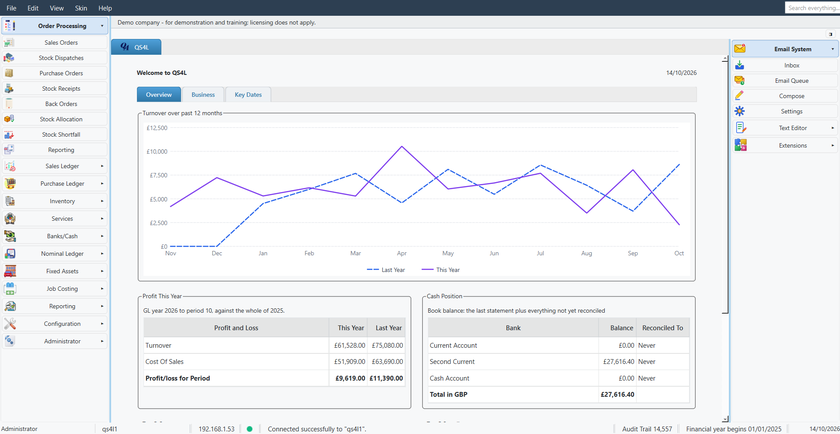
The moment you log in, QuiSuite shows how the business is doing and what needs your attention. The dashboard has three tabs and only shows the modules you use.
Overview
- A turnover chart for the past 12 months, with the same months last year beside it.
- Profit this year so far: turnover, cost of sales, overheads and net profit, against the same point last year.
- Cash position: the book balance of every bank account, when each was last reconciled, and the total.
- Your top five customers and suppliers, and what each one owes or is owed.
Business
- Money due in and out by due date: overdue, the next 30 days, 31-60, 61-90 days and later; aged debtors and creditors side by side, with credit notes taken off.
- A to-do list: unposted invoices, overdue accounts, unreconciled bank items, contracts due, orders to dispatch or invoice, overdue CRM activities. Click a line to go straight to the screen that deals with it.
- Your five most profitable jobs, the CRM pipeline and today's exchange rates.
Key Dates
- Every deadline in date order: the CIS return and payment, depreciation, contract billing, payments due, the year end and your licence renewal.
- Overdue items in red, anything due within seven days in amber.
More of QuiSuite: Across the Whole Program Sales Ledger Purchase Ledger Inventory and Stock Control Banking and Cash Nominal Ledger and Financial Statements Report Writer Configuration and Multi-currency Administration, Security and Data Safety CRM Email Letters and Documents Web Browser and Desk Tools Intranet and Messaging Optional modules